

Introduction
Video content is booming. More businesses, creators, and marketers need fast, polished video work. Raw footage alone is seldom enough; editors need reliable stock footage to fill gaps, enhance stories, and produce projects on tight schedules.
This guide addresses frequently asked questions to help you utilize stock footage effectively, hire reliable editing services, and elevate your video work efficiently.
Where Can I Find Good Video Editing Services Online?
If you want pro-video editing done by skilled teams, several reputable video editing services in the US, UK, and Australia deliver. Each platform below serves different budgets and project types. Here are the top ones in each country, followed by what to compare when choosing.
Top Platforms / Agencies
| Country | Service | Description |
| USA | Vidchops | Subscription-based service that handles unlimited video editing for creators, with dedicated editors |
| USA | Tasty Edits | Offers both per-video packages and quick edits for social media content and YouTube creators |
| USA | Superside | Full creative service (video editing, motion graphics, design), excellent for businesses that need many videos |
| UK | BeCreatives | Edits for influencers, businesses, social media content, with local UK editors familiar with the trends |
| UK | Dragonfly | High-quality post-production, compositing, promotional video work, focusing on brand visuals |
| UK | Open House Pictures | Affordable video editing and post-production services, helping clients polish raw footage into compelling stories |
| Australia | Vidico | Known for high-impact creative, Vidico provides end-to-end video editing and post-production for both live-action and animated content |
| Australia | 1 Minute Media | This company excels at creating engaging and strategic short-form content for social media and online platforms, utilizing high-quality editing to maximize impact in a short time frame. |
| Australia | Dream Engine | Their video editing expertise focuses on transforming corporate raw footage into polished, professional videos for a range of purposes, including corporate, events, and social media |

Top video editing services in the US, UK, and Australia
When choosing how to pay for video editing services, you’ll often choose between a subscription (or “unlimited / flat-monthly”) model and a per-project (or package / freelance) model. Here are some comparisons between two options:
| Feature / Factor | Subscription Model | Per-Project / Package / Freelance Model |
| Cost predictability | High. Fixed monthly cost helps budgeting. | Variable. Depends on project scope; costs may spike unpredictably. |
| Average cost per video | Lower if you produce multiple videos per month; economies of scale. | Can be higher, especially for small or infrequent work. |
| Flexibility for special edits | Moderate. Special effects or unusual projects may cost extra or be out of plan. | High. You can negotiate or order only what you need. |
| Quality / consistency | Better: often same editor or team, set style, brand voice more consistent. | Variable: depends on who you hire each time, their style and understanding. |
| Turnaround time | Usually fast, especially on higher tiers; but sometimes limited by queue. | Varies a lot. Can be fast if you pay premium; but possibly slower or less reliable. |
| Revisions and scope changes | Often included (some “unlimited” revisions); scope limitations apply. | Clear scope per video; revisions may cost extra. |
| Commitment / risk | Must pay even if usage is low. Risk of paying for unused capacity. | Less commitment; you pay only for what you use. Lower risk when you have irregular needs. |
| Suitability | Best for steady creators, marketers, businesses needing regular content. | Best for those with sporadic needs, one-offs, small budgets, or special requirements. |
When selecting an editor or agency, you should keep an eye on:
- Speed: Turnaround time, how fast the first draft and revisions happen.
- Quality: Editing style, polish, transitions, audio and color correction.
- Communication: Clarity, how feedback is handled, and whether you get a dedicated editor.
- Specialization: Do they do social media, YouTube, corporate, short-form content only, promos, etc.?
- Honest pricing: No hidden fees, clear revision policies, and cost of extra services (stock footage media, effects, music).
>> Read more: Outsource Video Editing Like a Pro: Save Time, Cut Costs & Boost Quality
Where Can I Find Sample Videos to Practice Video Editing?
If you want to sharpen your editing skills, having access to raw clips is just as important as the tools you use. Here are some free and paid places to find downloadable sample videos:
| Platform | Free / Paid | Licensing Type | Key Features | Best For |
| Pixabay | Free | Royalty-free, no attribution needed | Large library, 4K and HD clips | Beginners who want quick downloads |
| Pexels | Free | Royalty-free, no attribution needed | Beautiful visuals, vertical and horizontal formats | Social media editors and short-form content practice |
| Videvo | Free and Paid | Mix of free clips (attribution) and premium (royalty-free) | Motion graphics, stock footage, sound effects | Practicing editing with layered multimedia |
| Mixkit | Free | Royalty-free, no attribution needed | High-quality curated clips, cinematic style | Learning color grading and transitions |
| Artgrid | Paid (subscription) | Royalty-free for commercial use | Full raw footage sequences, multi-angle shots | Intermediate and advanced practice with real-world sets |
| Envato Elements | Paid (subscription) | Royalty-free for commercial use | Stock video, templates, sound effects | Practicing editing full campaign-style videos |
| Storyblocks | Paid (subscription) | Royalty-free for commercial use | Large library, HD and 4K, diverse themes | Practicing fast editing with large batch footage |
Top free and paid stock footage places for downloaders
Also, YouTube Channels offer free raw footage for content creators. You can search using terms like “edit this video challenge” or “raw footage for editors.” Popular options include:
- Film Riot: They often release behind-the-scenes raw footage from short films for editing tutorials.
- Peter McKinnon: Occasionally shares uncut footage from travel and commercial projects.
- Cinecom.net: Provides practice project files and raw clips in their editing tutorials.
- Parker Walbeck / Full Time Filmmaker: Offers free demo clips for training exercises.
Downloaders can use tools like 4K Video Downloader to save raw clips offline, but always verify the channel allows practice use before editing.
You can also search for “practice editing footage” on platforms like Reddit (subreddits like r/filmmakers and r/editors), Discord groups for video editors, or forums such as VideoHive and Creative COW. These communities often run editing challenges where members share raw project files and give feedback on each other’s edits.
Are There Any Sites That Provide Free Stock Videos to Edit?
Yes, many good ones. But you must understand licensing to avoid issues. Below are the top free providers:
- Pexels: Thousands of high-quality clips, many in 4K, many licensed for personal and commercial use with no attribution required.
- Pixabay: Large free collection, royalty-free, including HD & 4K, no attribution for many clips.
- Videvo: Free clips, though license types vary; some require attribution.
- Coverr: Reliable site for free stock footage, useful for backgrounds and general B-roll.
- Mixkit: Curated free footage, often high quality, ready for commercial and personal projects.
Before downloading and editing any stock footage, it is crucial to understand the licensing terms that apply. Here’s why:
- Royalty-Free License: Many free sites use royalty-free licenses. That means you pay once (or not at all) and can use the clip multiple times, subject to license rules.
- Commercial Use Rights: Check if commercial use is allowed, if you’re using footage for paid work or business content.
- Creative Commons Licenses: If attribution is required, you must credit the creator in the way described.
- Editorial-Use-Only License: These clips can be used only for news, documentaries, or educational content where the footage is presented as factual information.
To make your edits versatile and professional-looking, here are some tips you should follow:
- Check video resolution before downloading: Search for 4K or HD, depending on your output needs. Higher resolution gives you flexibility for cropping or zooming.
- Use advanced search filters: Many free stock footage platforms like Pixabay, Pexels, and Videvo offer filters for resolution (HD, 4K), orientation (horizontal, vertical, square), and duration.
- Thematic footage helps: nature, technology, urban, people, abstract, etc. Mixing themes makes practice or project editing more creative.
- Verify licensing details for each clip: Check if attribution is required or if it’s royalty-free with no credit needed before incorporating footage into client projects.
- Explore mobile-friendly formats: For social media projects, prioritize vertical (9:16) or square (1:1) clips, which are often grouped under “social media” or “mobile” categories on stock sites.
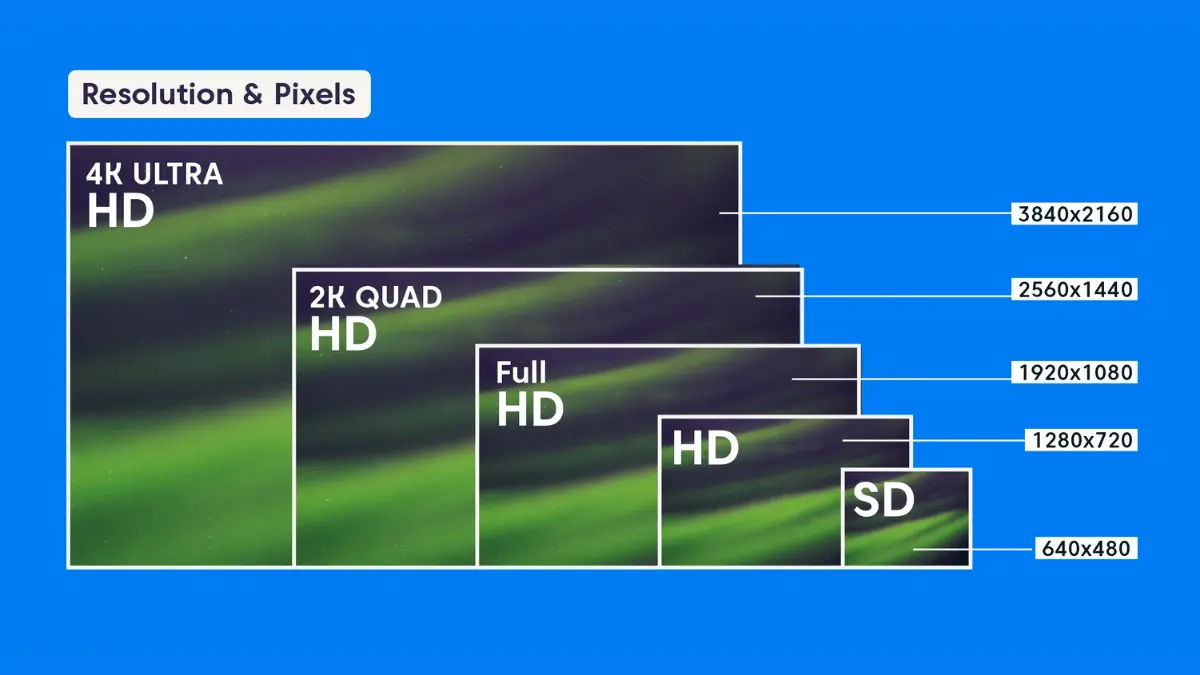
You should check the video resolution before downloading
Pros and Cons of Using Free Sites
| Pros | Cons |
| No cost (or very low cost), so low barrier to entry. | Quality may vary; not all clips are shot professionally. |
| Fast access; many clips pre-licensed for commercial work. | Sometimes limited selection in very specific themes or formats. |
| Good for practicing and filling smaller needs. | Attribution rules or license limits may constrain usage. |
| No need for custom shoots (time & cost saving). | Possible overuse of popular clips (many people use same-footage). |
Which Video Editing Tools Do Professional Agencies Use?
When editing professionally, having the right tools matters. Here are commonly used software and features that pros look for:
- Adobe Premiere Pro: Widely used for linear editing, strong plugin & effects support.
- Final Cut Pro: Popular among Mac users, efficient rendering, and smooth workflow for many.
- DaVinci Resolve: Excellent for color grading, also a full editing suite.
- After Effects: For motion graphics, compositing, and visual effects.
- CapCut: Fast turnaround, social media content editing, often used by creators.
- iMovie: Simpler, more entry-level, many use it for smaller or less demanding edits.
- Frame.io: Allows clients & editors to review, leave comments, and versions in the cloud.
- Canva (Video Editor): Simple, browser-based, often used when speed and simplicity are key.
- Vimeo Create: Help with templates, easy export, teamwork across locations.

The top commonly used software for editors
When selecting video editing tools, professional agencies prioritize platforms that support scalable workflows, creative flexibility, and cross-platform delivery. Below are key features they typically look for:
- Ability to output multiple formats (square, vertical, horizontal) to suit platforms.
- Smooth team workflow, like: Version control, easy feedback loops, shared assets.
- Advanced effects: transitions, motion graphics, color correction, audio mixing.
- Plugin ecosystems: extra visual effects, LUTs, stock media integration.
>> Read more: The Basics of Video Post-Production Work – Innovature Services
How Can I Get Professional Video Editing Done in 24 Hours?
Several agencies such as Visugu, Vidpros, and Tasty Edits offer fast-turnaround services that can deliver polished videos within 24 hours. These teams specialize in rapid workflows and have dedicated editors on standby.
To get results quickly:
- Prepare a clear brief with editing style, duration, and goals
- Provide ready-to-use raw footage organized and labeled
- Understand their revision policies to avoid delays
Choose agencies that offer real-time chat, dedicated editors, and feedback tools, so you can approve edits instantly and meet tight deadlines.
Conclusion
You now know where to find quality stock footage, how to practice, which free and paid sources are good, what software pros use, how to choose video editing services, and how to get high-quality editing fast, even in 24 hours.
Ready for next-level videos fast? contact Innovature Studio now to unlock professional editing—sometimes in just 24 hours!