

In a digital world saturated with visual content, finding efficient solutions for editing multiple images simultaneously, as well as for photo retouching, is paramount. In this article, we explore the top 10 batch photo editors, each offering unique features and functionalities to streamline your editing workflow and elevate the quality of your images. Whether you’re a professional photographer, social media marketer, or hobbyist enthusiast, these versatile tools are designed to meet your diverse editing needs with ease and precision.
Why Batch Photo Editing?
Batch photo editing is a crucial process for organizations that handle large volumes of images regularly. This approach streamlines the workflow by allowing multiple photos to be edited simultaneously, ensuring consistency and saving time.
Whether for e-commerce, real estate, or social media marketing, maintaining a uniform look across a collection of images is essential for brand coherence and professional presentation. Batch editing enables companies to apply the same adjustments—such as color correction, cropping, and retouching—to all images in one go, reducing the manual effort required and minimizing the risk of errors.
In addition to efficiency, batch photo editing is cost-effective. Hiring professional photo editors or using advanced software for individual photo adjustments can be expensive and time-consuming. By automating the editing process for multiple images, businesses can allocate their resources more effectively, focusing on other critical areas of operation. This is particularly beneficial for industries that rely heavily on visual content, such as fashion, advertising, and digital media, where the volume of images can be overwhelming.
Moreover, batch photo editing ensures consistency in visual aesthetics, which is vital for brand identity. Consistent imagery helps in building trust and recognition among customers. For instance, an online store with uniformly edited product photos appears more reliable and appealing compared to one with varying image quality. This uniformity can enhance the overall user experience, potentially increasing customer satisfaction and boosting sales.
Batch photo editing offers significant advantages in terms of efficiency, cost savings, and consistency. Organizations looking to optimize their image processing workflows and maintain a high standard of visual content should consider leveraging batch editing techniques.
Top 10 Best Batch Photo Editors
Adobe Lightroom

Source: Internet
Adobe Lightroom stands as a premier batch image processing solution, esteemed by seasoned photographers and retouchers alike. Its versatility lies in its ability to streamline editing tasks through presets and synchronization features. With Lightroom, users can save a set of adjustments as presets or synchronize changes across multiple images, ensuring consistency and efficiency in workflow. The software’s speed is often a point of comparison in Lightroom vs Photoshop discussions, with Lightroom frequently emerging as the preferred choice, thanks to its presets that expedite traditional editing processes.
By utilizing the Basic Panel or simply copying and pasting adjustments, users can effortlessly apply edits to batches of photos, saving valuable time and effort. Furthermore, Lightroom’s commitment to continual improvement is evident in its automatic enhancement algorithms, which evolve with each new version of the software. These enhancements enable users to achieve desired results with minimal manual intervention, further enhancing the appeal of Lightroom as a go-to tool for batch photo editing.
BatchPhoto

Source: Internet
BatchPhoto presents itself as a user-friendly batch photo editor designed specifically for Windows and Mac users. Its straightforward approach is evident in its 3-step wizard, which simplifies the editing process immensely. Firstly, users import their photos; then, they make the necessary adjustments in the second step, and finally, they choose the desired export format and destination in the third step. Once these steps are completed, BatchPhoto automatically applies the selected changes to all imported images, streamlining the editing workflow effectively.
One of the standout features of BatchPhoto is its ability to save editing parameters as profiles, allowing users to reuse them conveniently from the Windows Explorer menu. This means that users can right-click any image and apply their chosen profile without the need to launch the software, enhancing efficiency further. In terms of exporting options, BatchPhoto offers flexibility, allowing users to save the enhanced images to their PC, upload them to FTP servers, or send them to other users via email. This versatility makes BatchPhoto a valuable tool for users seeking a simple yet powerful solution for batch photo editing on Windows platforms.
PhotoWorks

PhotoWorks emerges as a versatile, non-destructive photo editor tailored for both PC and Mac users, offering seamless editing capabilities across multiple photos simultaneously. With its Batch Processing mode, users can effortlessly adjust colors and tones, add captions, resize images, convert formats, and even apply watermarks to groups of images with live previews, all in a matter of seconds. This streamlined process is complemented by a diverse range of pre-designed filters inspired by popular movies like Harry Potter or Titanic, vintage styles like the 70s, or effects such as Sunlight, Kodak, or Polaroid film, providing users with endless creative possibilities at their fingertips.
One of the standout features of PhotoWorks lies in its support for RAW photo editing, including autocorrection for individual RAW images or entire batches, eliminating the need for separate file converters or plugins. The program’s AI-driven tools also set it apart from other editors by implementing content-aware autocorrection, intelligently identifying and fixing problematic areas in each photo individually, ensuring optimal results without the need for manual adjustments.
Furthermore, PhotoWorks distinguishes itself with its cost-effective lifetime license model, sparing users from the hassle of recurring monthly subscriptions. Users can explore its capabilities risk-free with a free trial, experiencing firsthand the efficiency and versatility that PhotoWorks brings to their photo editing workflow.
Picsart

Picsart stands out as a comprehensive batch photo editor, enabling users to edit up to 50 images simultaneously. Its versatile toolset includes features like background removal for multiple pictures, upscaling and resizing images in bulk, cropping, and adding watermarks. However, it’s important to note that while the free version offers these capabilities, it leaves a Picsart watermark on edited files and restricts the exporting of pictures.
To unlock additional features and remove watermarks, users can opt for one of Picsart’s paid plans: the Free version, Picsart Gold for $4.66/month, or Team for $6.24/month. Whether accessing the editor online or downloading it from platforms like the Microsoft Store, Google Play, or App Store, users have multiple options for using Picsart. However, it’s worth considering that the mobile app version may come with distracting ads, which can detract from the user experience.
Pixlr

Pixlr emerges as an excellent choice for users seeking to edit a large volume of images with optimal speed and efficiency. This PC-based photo editing software offers superfast export capabilities and user-friendly controls, making it an ideal solution for photographers, social media content creators, and anyone engaged in bulk image editing tasks.
The standout feature of Pixlr is its Batch Edit functionality, which enables users to apply desired edits to multiple photos simultaneously. To access this feature, users simply launch Pixlr in their browser, navigate to the “File” menu, and select “Batch Edit” from the available options. This action brings up the Batch Edit user interface, where users can apply adjustable presets to as many images as needed, streamlining the editing process and enhancing productivity significantly. With Pixlr, users can achieve professional-quality edits across a large number of images with ease and efficiency.
Polarr

Polarr emerges as an exceptional choice for those engaged in advanced bulk image editing endeavors. Boasting a meticulously crafted layout and contemporary design, this photo editing software offers a versatile toolkit that caters to various editing needs.
The process of batch image processing with Polarr begins with setting the dimensions and orientation of the photos, laying the groundwork for subsequent editing tasks. Users can then delve into basic adjustments, fine-tuning elements such as exposure, contrast, saturation, and more, ensuring each image meets their desired standards.
One notable feature of Polarr is its dedicated toolkit for skin imperfection removal, simplifying the task of achieving flawless portraits. With specialized tools at their disposal, users can effortlessly erase imperfections and even make subtle enhancements to facial features, enhancing the overall quality of the images.
As the editing process nears completion, users have the opportunity to elevate their images further by applying filters or effects that add a unique touch to the final results. With Polarr’s comprehensive suite of features and intuitive interface, users can achieve remarkable outcomes in bulk image editing projects, making it an invaluable tool for professionals and enthusiasts alike.
Fotophire

Fotophire stands out for its remarkable functionality in enhancing entire folders of images simultaneously, making it a valuable tool for efficient batch editing. The software’s tools are neatly categorized into three main sections, each serving a specific purpose: adjusting the general appearance of the image, improving the background, and removing unwanted objects from photos.
This batch photo editor and photo enlargement software offer a range of advanced tools that empower users to resize and reposition images before diving into color adjustments, shadows, highlights, and more. Additionally, users have access to various artistic effects and filters, which can significantly streamline the editing process and save valuable time. These features are conveniently housed within the intuitive and feature-rich Photo Editor section, catering to the needs of both amateur and professional users alike. With its comprehensive toolset and user-friendly interface, Fotophire proves to be a versatile solution for batch photo editing and enhancement.
BeFunky
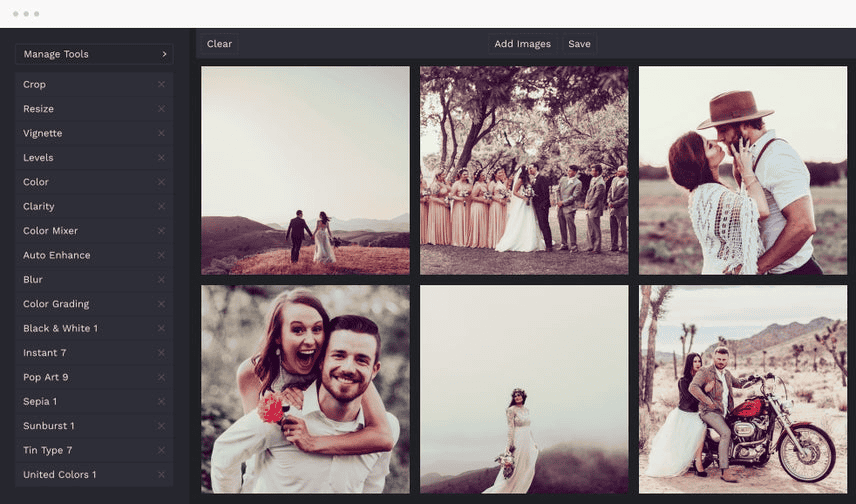
BeFunky Photo Editor emerges as a popular solution for batch editing photos, offering a comprehensive suite of features for cropping, resizing, and enhancing images with filters. With this tool, users can efficiently resize multiple photos by importing them, specifying the desired scale or pixel count, and applying the changes across selected images simultaneously.
One of BeFunky’s key features is its extensive collection of built-in photo filters, which provide users with a convenient way to enhance their images for various social media platforms. Additionally, the software enables users to apply watermarks to entire batches of photos, adding a professional touch to their work. Users can import their watermark or logo, position it within the image, adjust its opacity, and save it as a preset, streamlining the watermarking process for future use.
Overall, BeFunky Photo Editor offers a user-friendly interface and versatile functionality, making it a go-to choice for both amateur and professional photographers seeking to streamline their batch editing workflows and elevate the quality of their images.
Fotor
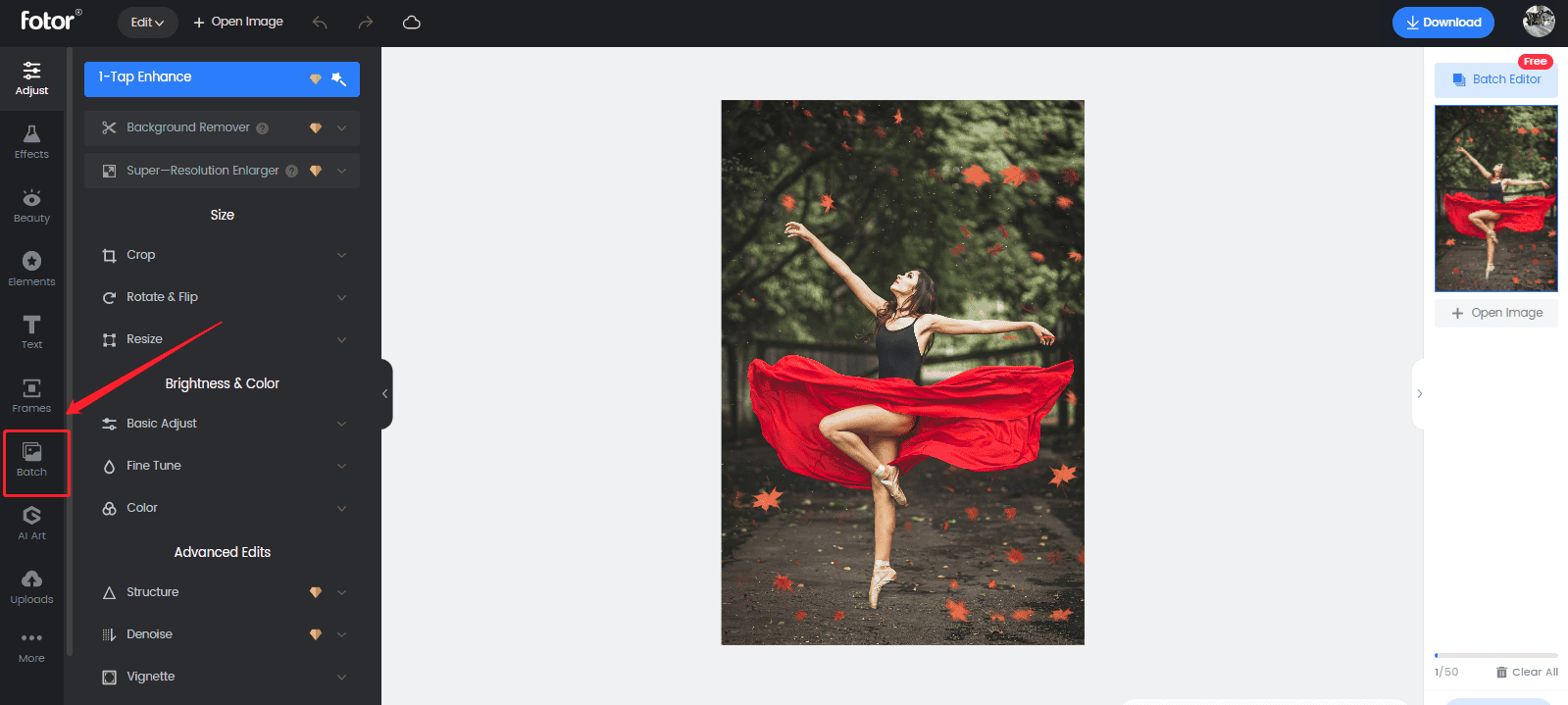
Fotor stands out as a modern software solution designed to cater to users of all skill levels, offering intuitive tools to facilitate project completion with ease. Equipped with basic image retouching capabilities, batch photo editing functionality, and organizational features, Fotor serves as a versatile tool for various editing tasks.
Users can effortlessly adjust the dimensions or orientation of photos, as well as fine-tune elements such as contrast, exposure, highlights, and shadows to achieve basic color correction. The software also provides specialized tools tailored for portraiture, allowing users to remove blemishes and wrinkles, correct red-eye defects, and enhance teeth whitening for polished results.
Beyond its practical editing features, Fotor offers a range of fun and creative options, including stickers, captions, and decorative frames, allowing users to infuse their projects with personality and flair. With its user-friendly interface and diverse array of features, Fotor empowers users to bring their creative visions to life, regardless of their level of experience.
Faststone Photo Resizer

Faststone Photo Resizer offers a comprehensive set of features designed to simplify the process of organizing and editing photos, making it an ideal choice for beginners. Despite its user-friendly interface, the software boasts a robust toolkit that enables users to perform a wide range of tasks with ease.
Users can effortlessly modify the dimensions, orientation, and filenames of photos, as well as apply watermarks or captions, adjust colors, add frames, and more, whether working on a single image or processing an entire batch. The inclusion of the multithreading feature enhances efficiency, allowing the batch photo editor to tackle large tasks at a significantly faster pace.
With Faststone Photo Resizer, users have the flexibility to assign specific names to bundles of images and fine-tune conversions using preview options. This versatility makes the software well-suited for tasks such as renaming, editing, and converting batches of images, empowering users to achieve professional-quality results with minimal effort.
Innovature BPO’s Photo Editing Service: Batch Photo Editing Solutions
Innovature BPO’s Photo Editing Service emerges as a reliable and efficient solution for businesses seeking batch photo editing solutions. With a commitment to excellence and a focus on meeting the diverse needs of clients, Innovature BPO offers a comprehensive suite of services tailored to streamline the editing process for large volumes of images.
At the core of Innovature BPO’s offerings is its expertise in batch photo editing, allowing clients to optimize their image processing workflows with ease and efficiency. Whether it’s adjusting colors, cropping, retouching, or applying other enhancements, Innovature BPO‘s team of skilled professionals ensures consistent and high-quality results across all images.
One of the key advantages of Innovature BPO’s Photo Editing Service is its ability to handle large tasks with precision and speed. By leveraging advanced technologies and streamlined processes, the service can efficiently process batches of images, saving clients valuable time and resources.
Moreover, Innovature BPO‘s dedication to client satisfaction is evident in its personalized approach to service delivery. The team works closely with clients to understand their specific requirements and preferences, ensuring that the final deliverables meet or exceed expectations. With a focus on quality, efficiency, and client satisfaction, Innovature BPO stands out as a trusted partner for optimizing and enhancing visual content.
See more»
- What Is Photo Retouching and How It Elevates Your Visual
- Navigating Liquify Tool in Photoshop: A Comprehensive Guide
- Guide to Using the Spot Healing Brush Tool in Photoshop
- How to Sharpen Images in Photoshop: A Step-by-Step Tutorial
- What is Frequency Separation and How Can It Improve Photo Retouching
- How to Dodge and Burn in Photoshop
- How to Adjust Hue and Saturation in Photoshop
- A Beginner’s Walkthrough: How to Resize an Image in Photoshop
- How to Use Curves Tool in Photoshop
- How to Use Clone Stamp Tool in Photoshop: A Step-by-Step Guide
- Best AI photo enhancer tools you should know